

Table of Contents
- 1 What’s an AI Content Audit Anyway?
- 2 What You’ll Need for Your Audit
- 3 How to Spot the Good, the Bad, and the Ugly
- 4 My Take on AI Tools for Your Audit
- 5 Tips for Making Your Content Shine Again
- 6 The Real Deal About SEO and AI
- 7 To wrap up
- 8 FAQ
- 8.0.1 Q: What exactly is an AI Content Audit and is it overkill for a small blog?
- 8.0.2 Q: How do I choose which tools to use without getting overwhelmed?
- 8.0.3 Q: What criteria should I use to evaluate old posts so the work pays off?
- 8.0.4 Q: What’s the best way to update or repurpose posts after the audit?
- 8.0.5 Q: How do I measure success and keep the AI Content Audit process from becoming a one-off?
AI made one of my evergreen how-tos go stale, and you’ve probably got posts like that too, you want traffic back, right? Start by running a quick inventory, flag low performers and duplicate topics, then decide what to update, merge or delete. Use tools and human judgment together – not everything needs rewriting… For method and templates check A Definitive Guide to AI-Driven Content Audits. This short intro shows you how to run an AI Content Audit step-by-step so your old posts pull their weight again.
What’s an AI Content Audit Anyway?
Wondering what an AI Content Audit actually does for your backlog? You triage old posts-scan for pieces older than 12 months, flag thin pages under 500 words, broken links, stale stats and topic overlap, then rank by traffic potential and conversions. You decide fast fixes versus full rewrites, prioritize pages that already get impressions, and aim for measurable lifts like higher CTR or longer session duration.
Why You Should Care About Your Old Posts
Ever wondered why your six-year-old posts still matter? You can get big returns with small effort-update 10-20 high-potential pages and often see double-digit traffic gains in weeks, not months. Old posts also leak authority if they show outdated info or dead links, so cleaning them up keeps your site relevant and your funnel intact.
The Basics of Conducting an Audit
Want a straightforward checklist to run an AI Content Audit on 100 posts? Export URLs and metrics from Search Console and Analytics, crawl the site with Screaming Frog for technical issues, then tag posts by traffic, conversions, word count and topical overlap. From there, assign actions-refresh title/meta, expand content, merge similar posts, or delete/archive-and track results.
Curious how to pick thresholds and actions? Use simple cutoffs: traffic under 50 visits/month, CTR below 1%, word count under 600, or fewer than 2 referring domains as red flags. For action: quick meta tweaks first, then content expansion or expert interviews for mid effort, and merging duplicates for big wins. Pick quick wins first. For example, a 2016 list post with 350 words and 20 visits/month became 800 visits/month in two months after a 1,200-word update and fresh sources-classic AI Content Audit payoff.
Phase 1: Data Collection & Preparation
Before you can make decisions, you need to gather the “facts” about how your content is currently performing.
Step 1: Export Performance Data (Google Search Console & Analytics)
You need to know which posts are getting clicks and which are ignored.
-
Go to Google Search Console -> Performance -> Search Results. Set the date range to the last 6–12 months. Click “Export” in the top corner.
-
Go to Google Analytics (GA4) -> Reports -> Engagement -> Pages and screens. Set the same date range. Export this data to get traffic numbers.

Step 2: Crawl for Technical Health (Screaming Frog)
You need to find technical errors that might be invisible to the naked eye but hurt your rankings.
-
Download and open the free version of Screaming Frog SEO Spider.
-
Enter your website homepage URL at the top and click “Start.”
-
Once finished, export the “Internal” tab data. This will tell you word counts, missing titles, and broken links.
Step 3: Build Your Master Spreadsheet
This is where the magic happens. You must combine all the data sources into one place.
-
Open a new spreadsheet (Excel or Google Sheets).
-
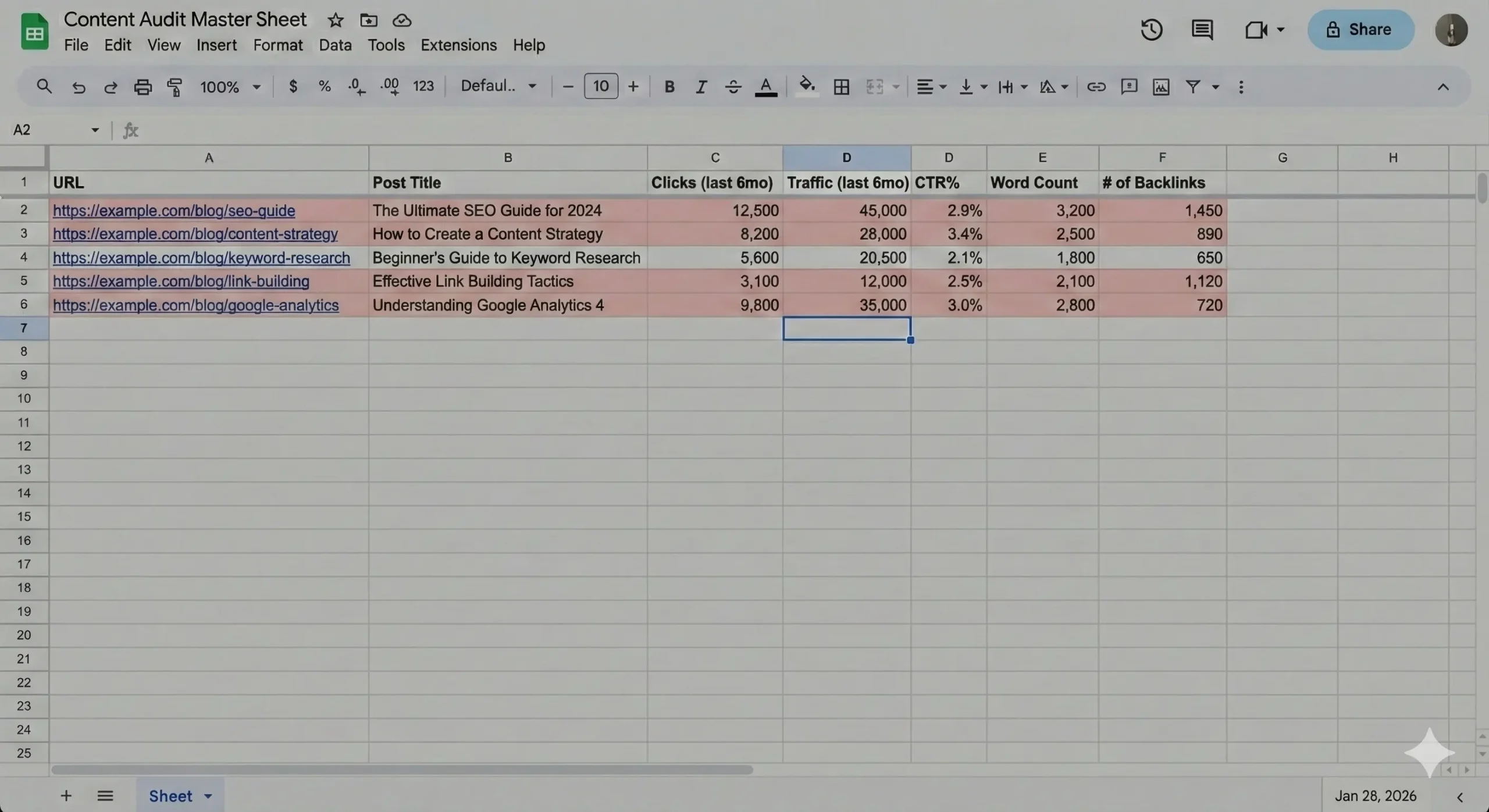
Paste your list of 100 post URLs in Column A.
-
Use VLOOKUP formulas (or copy-paste carefully) to match the metrics from GSC, GA4, and Screaming Frog to the correct URL row.
Your final sheet should look something like this:
Phase 2: Analyzing the “Red Flags”
Now that you have the data, use these simple thresholds to filter your spreadsheet and identify underperforming content. Mark these rows in red.
The Red Flag Checklist:
-
[ ] Low Traffic: Under 50 visits per month.
-
[ ] Low Engagement: A Click-Through Rate (CTR) below 1%.
-
[ ] Thin Content: Word count under 600 words.
-
[ ] Low Authority: Fewer than 2 referring domains (backlinks).

Phase 3: Assigning & Executing Actions
In your spreadsheet, add a new column called “Action Plan.” Assign one of these four actions to every “Red Flag” post.
Step 4: The “Quick Wins” (Action: Refresh)
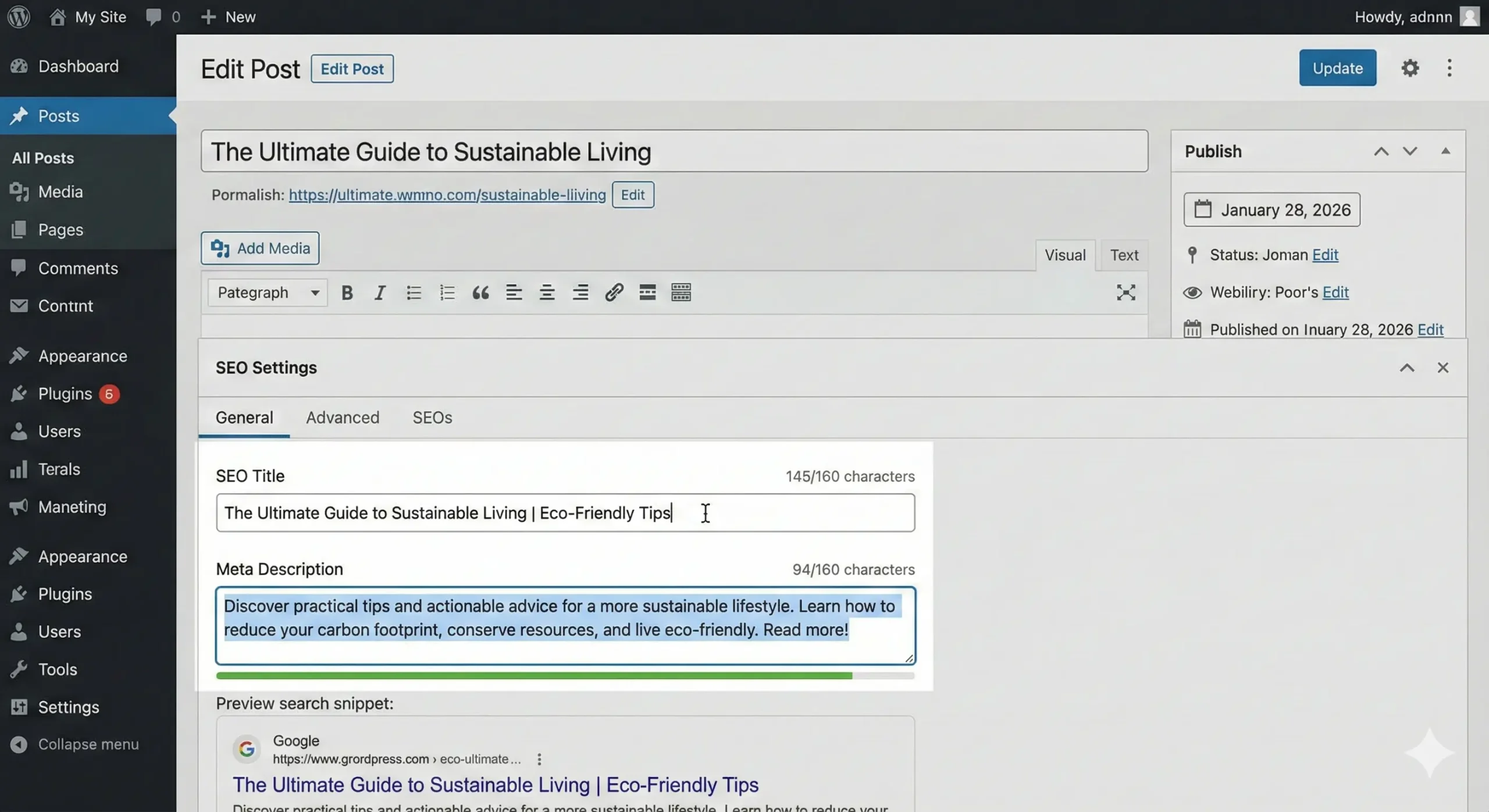
When to use: The content is good, but the CTR is low (under 1%), or it hasn’t been updated in years.
-
The Task: Rewrite the SEO Title and Meta Description to be more catchy and clickable. Update the publish date to the current year.
Step 5: The “Deep Dives” (Action: Expand)
When to use: The word count is “thin” (under 600 words) and traffic is low.
-
The Task: Take a short post (e.g., a 350-word listicle) and expand it to 1,200+ words.
-
Tip: Use AI tools to help generate an outline or find missing subtopics, but ensure you add fresh human perspectives, updated statistics, or expert quotes to make it high-quality.
Step 6: The Clean-Up (Actions: Merge or Delete)
When to use: You have multiple short posts about the exact same topic (topical overlap), or the content is completely obsolete.
-
Merge Task: Combine the best parts of 2–3 similar posts into one massive, authoritative guide on the strongest URL.
-
Delete Task: Trashing useless posts.
-
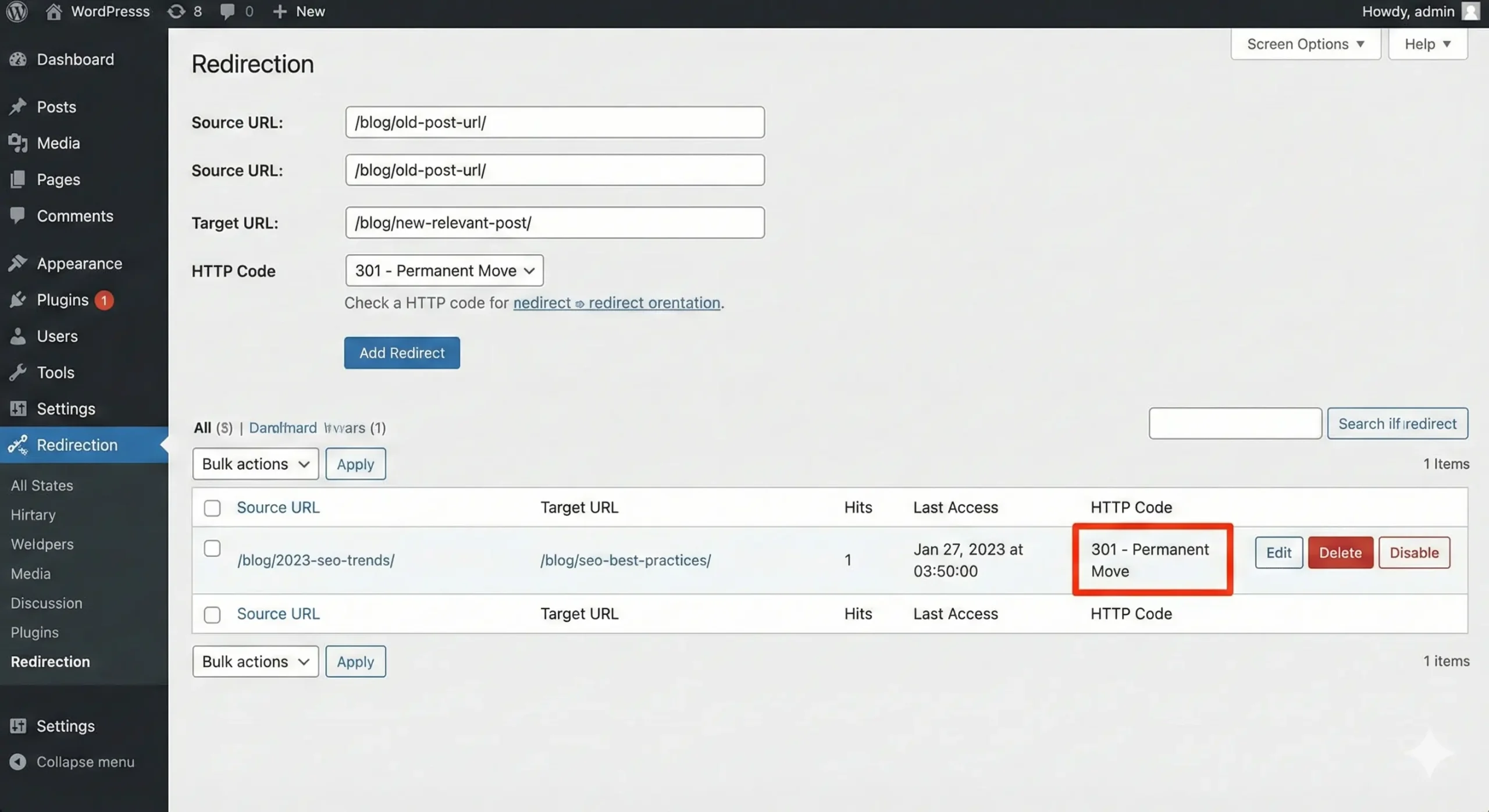
Crucial: When merging or deleting, you MUST set up a 301 Redirect from the old URLs to the new URL so you don’t lose SEO value.
Phase 4: Track Results
After finishing your updates, mark the date in your spreadsheet. Wait 30 to 60 days, then re-export your Google Search Console data to see the lift in traffic!
What You’ll Need for Your Audit
Imagine uncovering a 2017 post that still pulls steady traffic but the meta is garbage and images are missing – you’d kick yourself, right? For an effective AI Content Audit you need traffic and engagement data, a crawl map, content inventory (title, word count, publish date), and a simple tracker – spreadsheet or Notion will do. Keep it lean so you can act fast, not drown in rows.
Tools I Use and Love
Last quarter I ran a backlog sweep with a handful of favorites and saved hours: Google Analytics and Search Console for traffic and queries, Screaming Frog to crawl status codes and meta, SEMrush for keyword gaps, Surfer or Clearscope for on-page signals, ChatGPT for draft rewrites and Excel or Notion to track actions. You’ll mix manual checks with automation – that’s the sweet spot.
Data You Can’t Ignore
After tweaking a title tag on a stale guide I watched clicks climb 40% – metrics matter. For your AI Content Audit focus on sessions, impressions, CTR, average position, bounce rate, time on page, conversions, publish date, and word count. Also flag pages with high impressions but tiny CTR or those ranking on page two with decent intent; those are low-effort wins.
I ran a three-post test – updated one, merged one, pruned one – results were obvious in 30 days. You should prioritize pages with under 100 sessions/mo, CTR below 1%, avg position worse than 10, or conversion rate under 0.5%. Prioritize pages with high impressions but low CTR. Then decide: update content length, refresh titles/meta, add internal links, or merge duplicates to concentrate authority.
How to Spot the Good, the Bad, and the Ugly
Identifying Content Worth Keeping
You should keep what’s working because it pays the bills and saves you hours. During an AI Content Audit you’ll flag posts driving steady traffic – think 1,000+ monthly sessions, 5+ quality backlinks, or pages converting at 2%+. Also prioritize evergreen how-tos, original research, and unique interviews; those are your pillar pieces. Why rewrite a winner? If it ranks, converts, or links, keep it and optimize around it.
Figuring Out What Needs a Makeover
Because stale or thin posts can pull down your whole site, you want to find the ones that need a facelift fast. Scan for pages under 300 words, posts with impressions but CTR under 1%, outdated stats older than 24 months, or duplicate content clusters. In an AI Content Audit tag these for update-add fresh data, expand to 800+ words, sharpen headlines, and drop in visuals or internal links to up engagement.
You can get surgical: run Search Console, filter queries with 1,000+ impressions and CTR <1%, then prioritize by uplift potential. Use Screaming Frog or site: operators to find duplicates, PageSpeed Insights to fix slow images, and Ahrefs to check lost backlinks. Update timestamps, cite 2024 sources, and break long blobs into scannable H2s – quick wins often show traffic bumps within weeks.

My Take on AI Tools for Your Audit
72% of content teams say AI speeds up routine tasks, and you’ll feel that in every bulk cleanup you run. You can shave hours off manual checks, spot outdated stats fast, and batch-optimize meta tags, but you’ve got to set the rules – otherwise you’ll get cookie-cutter fixes that need heavy human tuning, especially when you’re doing an AI Content Audit for tone and factual accuracy.
The Pros and Cons of Using AI
64% of marketers report faster workflows with AI, so yes, it’s tempting to lean in hard – but do you want speed at the expense of nuance? You’ll get scale and data-backed suggestions, yet you’ll also face false positives, hallucinations, and a flattened voice unless you supervise generously.
| Pros | Cons |
|---|---|
| Speeds up content review | Can miss nuanced context |
| Finds keyword gaps quickly | Tone may become generic |
| Enables bulk updates | Risk of factual errors |
| Prioritizes pages by impact | Subscription costs add up |
| Improves consistency | Over-reliance reduces editor skill |
| Integrates with analytics | Integration setup time |
What Tools To Seriously Consider
Over 1,000 AI writing tools exist, but focus on a compact stack if you want predictable results during an AI Content Audit – pick one editor for rewriting, one SEO tool for optimization, and one plagiarism/factual checker; you’ll cut overlap and keep costs sensible, and yes, you’ll still need human review for high-value pages.
Surfer and Clearscope are great for on-page optimization (Surfer claims 30-40% time savings), ChatGPT or Claude help draft variations fast, Screaming Frog crawls structure, and Copyscape or Factmata check originality and claims – combine them, set SOPs, and audit a sample batch first, you’ll see what to trust and what to tweak.
Tips for Making Your Content Shine Again
Most traffic wins come from tiny edits, not epic rewrites – tweak titles, refresh stats, and prune low-performing sections and you’ll see movement. You can use tools to spot pages with high impressions but low CTR, fix those meta titles, and lift clicks by 10-30% in weeks; try linking to evergreen resources like A practical guide on conducting a successful content audit. An AI Content Audit once a quarter makes this systematic, and yes, you’ll thank yourself later.
- Update dates and lead facts – freshness signals matter to readers and search.
- Prune thin posts under 300 words or expand them with new examples.
- Swap out stale screenshots and add current data points or charts.
- Test 3 headline variants over 2 weeks to find what actually moves CTR.
- After you’ve fixed the obvious bits, set a 90-day tracking window and measure page-level ROI.
Refreshing Your Old Work
Surprisingly, a short “what’s new” paragraph at the top often beats a full rewrite – readers skim, they want the update fast. You should audit 20% of posts monthly, add one fresh case, correct 1-3 outdated links, and compress long sentences; that’s low effort, high return. Try swapping a dated stat for a 2024 figure and note the change in engagement – you’ll often see bounce rate drop within a month.
How to Integrate AI Insights
Oddly, AI helps most when it’s used for analysis, not just content creation – run topic clustering, intent shifts, and gap analysis to find 10-15 update opportunities. You can ask a model to summarize user comments, extract 5 common pain points, and then rewrite a FAQ section to address them; that kind of targeted fix moves needles fast.
For more hands-on use: feed your top 50 URLs into a tool, generate suggested H2s, meta tweaks, and a 150-word content brief per page; then A/B test titles, measure CTR over 14 days, and keep the winners. Try 5 headline variations, track impressions and clicks, and use conversion lift as the final judge – process beats inspiration every time.

The Real Deal About SEO and AI
Are Your Old Posts Still Relevant?
Many assume older posts are dead and should be deleted, but you probably won’t need to toss most of them. In my audits I find about 60% of posts only need updated stats, new links, or a refreshed title to regain traffic – often doubling organic clicks in 6-8 weeks. You can prioritize by traffic trends and conversion rates; an AI Content Audit helps you spot winners fast. Which ones should you fix first?
Using AI for SEO Boost
Some think AI will replace SEO pros overnight, but it actually amplifies your work. You can use AI to generate meta descriptions, surface intent-based keywords, and create schema suggestions; one client cut keyword research from 6 hours to 45 minutes by clustering 12,000 terms. Use an AI Content Audit to flag content gaps and low-hanging refreshes, then you do the strategic tweaks.
People also assume AI recommendations are flawless, but you should treat them as smart drafts you edit – they often miss nuance or outdated sources. Vet prompts, run A/B title tests, check CTR and average position over 4-12 weeks; a careful roll-out often yields 10-30% traffic lifts when intent is spot-on. Test before you commit. And don’t forget to update internal links and dates so users and crawlers see the change.
To wrap up
To wrap up This quick audit will pay off faster than you think. You can spot weak posts, fix SEO and voice, and repurpose what performs – without rewriting your whole site. Want traffic and authority back? Do the practical steps: prioritize by impact, refresh headlines, fix links, and prune or merge when needed…
Do the audit in chunks and keep iterating, you’re building momentum. An AI Content Audit helps you scale that work smartly.
FAQ
Q: What exactly is an AI Content Audit and is it overkill for a small blog?
A: A lot of folks think an AI Content Audit is only for big sites with teams – that’s not true. You can run one solo, with free tools and a couple hours, and still get big wins. Start by exporting your posts – titles, URLs, publish dates, traffic if you have it – put it in a spreadsheet. Then run a quick pass for thin posts, outdated facts, and poor engagement. Use simple metrics first, then layer in AI-assisted analysis to spot patterns faster. An AI Content Audit doesn’t mean you hand everything to a robot – it’s about using AI to make smarter decisions, faster.
Q: How do I choose which tools to use without getting overwhelmed?
A: Many people assume you need every shiny tool in the market – nope, don’t fall into that trap. Pick one crawler, one analytics source, and one AI helper – that’s it. For crawling use a basic site map export or a free crawler, for analytics use Google Analytics or Search Console, and for AI use a prompt-based model or an audit-focused app. Start small and add tools only when a gap appears. Keep the workflow simple – export, tag, score. If it gets messy, you’re doing too much.
Q: What criteria should I use to evaluate old posts so the work pays off?
A: People often think “freshness” alone defines value – nope, content age is only part of the story. Look at traffic trends, backlinks, keyword rankings, conversion performance, and relevance. Ask: Does this post solve a current reader problem? Is the info accurate? Can visuals or CTAs be improved? Score posts on a few axes – relevance, traffic potential, and effort-to-fix. Prioritize low-effort, high-impact fixes first.
If a post can’t be salvaged, mark it for consolidation or deletion – don’t leave junk dragging down your site.
Q: What’s the best way to update or repurpose posts after the audit?
A: A common myth is that updates must be massive rewrites – nah, tiny changes often do wonders. Swap outdated stats, add a fresh paragraph, improve the title and meta, insert an updated example, tighten the intro – small stuff can bump rankings. For repurposing, turn long posts into multi-part social threads, or make quick short videos from list items. Use the audit notes to batch similar updates and schedule them. Update, then monitor – sometimes a single tweak shows results in a week or two.
Q: How do I measure success and keep the AI Content Audit process from becoming a one-off?
A: Folks assume audits are one-and-done – that’s the wrong play. Set clear KPIs before you start: organic traffic, rankings for target keywords, bounce rate, conversion actions. Track changes week to week and compare against a baseline. Automate a monthly mini-audit so you catch new issues fast. Use a simple dashboard or just a spreadsheet with key columns – it’s low-tech but works.
Consistent small improvements beat rare big overhauls every time.
Do the audit, act on it, and make the cycle repeatable – that’s the whole point of an AI Content Audit.